 Bloocky
A timeblocking calendar, inside Neovim.
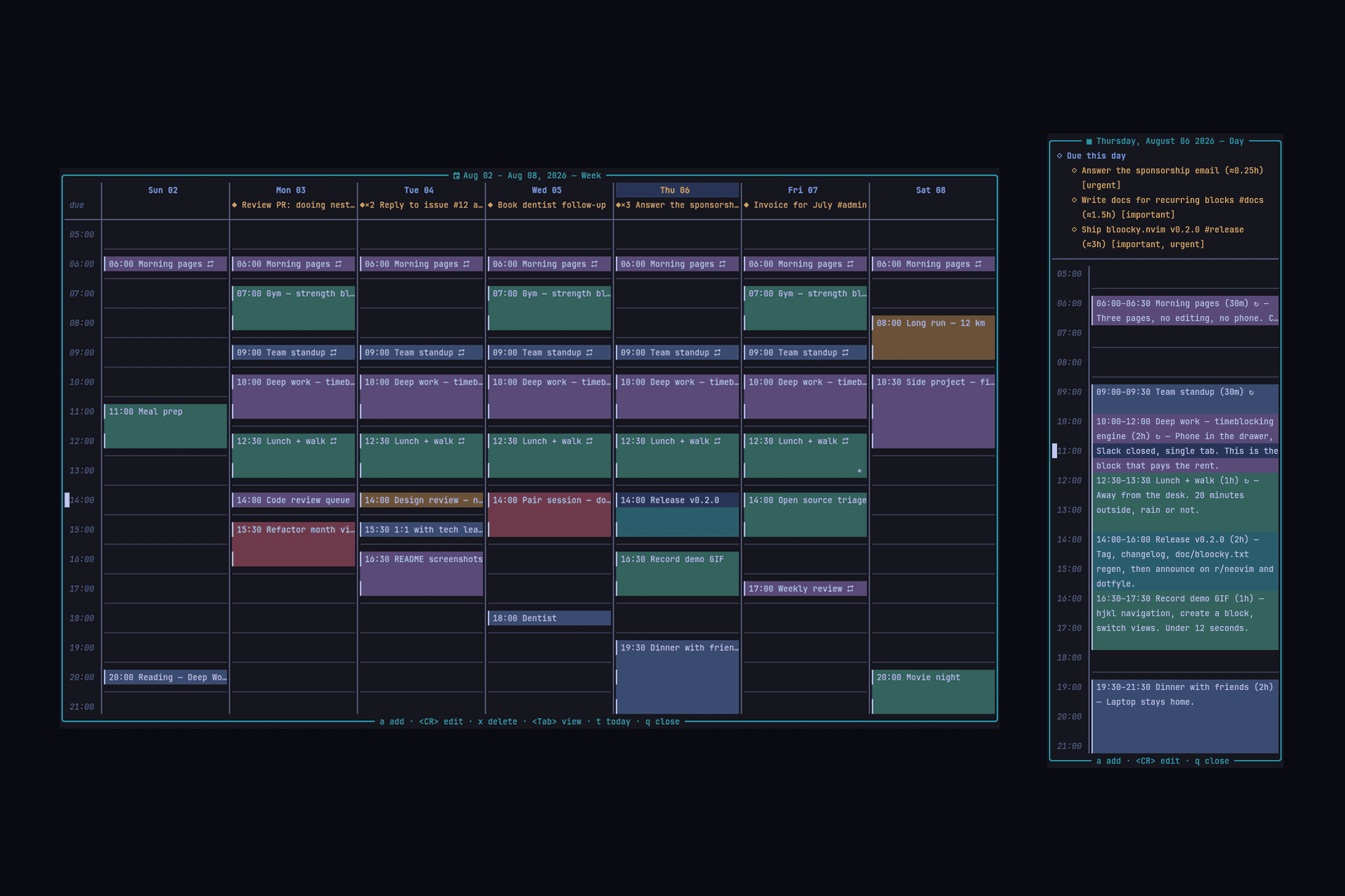
Bloocky lets you plan your day by placing time blocks on a calendar with day, week and month views — navigated entirely with hjkl. Free, open source, zero dependencies, and everything stays on your machine.
Features
- Three views — full month calendar, week grid with hour rows, and a detailed day view.
- hjkl navigation — move across days and hours; H/L jump a whole month or week.
- Float or sidebar — a centered floating window by default, or a persistent split next to your code.
- Time blocks — give an action a start time and a duration, snapped to a configurable granularity (30 min by default).
- Recurring blocks — daily, weekly, weekdays or a custom set of days, with an optional end date.
- Two-way calendar sync — CalDAV and Google Calendar, both directions, conflicts surfaced — never silently resolved.
- All-day events — imported from your calendar and shown above the hour grid, spanning every day they cover.
- Companion app — opt-in LAN bus for your local blocks, paired by QR, three-way merged.
- Dooing integration — read-only: your todos show up on their due date without touching Dooing's data.
- Configurable working hours — decide which hour your day starts and ends, and whether the week starts on Sunday or Monday.
- Automatic persistence — blocks are saved to a plain JSON file on every change.
- :checkhealth bloocky — verifies the things that fail quietly, whether or not you use sync.
Installation
Requires Neovim ≥ 0.10.0. A Nerd Font is optional (icons are configurable); curl only if you turn on calendar sync.
lazy.nvim
{
    "atiladefreitas/bloocky",
    config = function()
        require("bloocky").setup({
            -- your custom config here (optional)
        })
    end,
}
vim.pack (built-in, Neovim ≥ 0.12)
vim.pack.add({ "https://github.com/atiladefreitas/bloocky" })

require("bloocky").setup()
packer.nvim
use({
    "atiladefreitas/bloocky",
    config = function()
        require("bloocky").setup()
    end,
})
vim-plug
Plug 'atiladefreitas/bloocky'

" after plug#end():
lua require("bloocky").setup()
Usage
- Open the calendar with
<leader>tb(or:Bloocky) - Move around with
hjkl; the highlighted slot is your cursor - Press
a(or<CR>on an empty slot) to open the block dialog - Fill in the fields —
Durationaccepts1h30m,45m,2h,90; setRepeatto daily, weekly, weekdays or custom, with an optional end date - Save with
<CR>, and watch the block spread over its hours on the grid <CR>on an existing block edits it,xdeletes it (recurring blocks delete the whole series)
Keybindings
Global
| <leader>tb | Toggle the calendar |
| <leader>tB | Toggle the calendar as a sidebar in day view |
Inside the calendar
| h / l | Previous / next day |
| j / k | Next / previous hour (week/day) or week (month) |
| H / L | Previous / next month (month view) or week |
| gd gw gm | Switch to day / week / month view |
| <Tab> | Cycle through the views |
| t | Jump to today |
| a | Create a block at the cursor slot |
| <CR> | Edit the block under the cursor (or create one) |
| x | Delete the block under the cursor |
| s | Sync with your calendar now (only when sync is on) |
| q / <Esc> | Close the calendar (<Esc> in floating mode only) |
The block dialog has its own set — <Tab> between fields, <CR> or <C-s> to save, dd to clear a field. Invalid fields are marked inline with the reason. Every keymap is remappable via setup().
Commands
| :Bloocky [day|week|month] | Open the calendar, optionally in a specific view |
| :BloockyToggle | Toggle the calendar |
| :BloockySidebar [view] | Open the calendar as a sidebar |
| :BloockyAdd | Open the calendar and jump straight into the creation dialog |
| :BloockySync [account] | Sync now (when sync is enabled) |
| :BloockySyncStatus | Last sync, pending changes and problems per account |
| :BloockySyncReport | Conflicts resolved in the calendar's favour |
| :BloockySyncRestore <n> | Restore a losing local version as a new block |
| :BloockyShare | Open the companion-app pairing QR in your browser |
| :BloockyServe / :BloockyServeStop | Start / stop the app server by hand |
| :checkhealth bloocky | Verify your setup end to end |
Configuration
Everything is configured through a single setup(opts) call, merged over sensible defaults. Sync and the companion app are off until you opt in. The most useful options:
require("bloocky").setup({
    -- Where time blocks are persisted
    save_path = vim.fn.stdpath("data") .. "/bloocky_blocks.json",

    -- View shown when the calendar opens: "day" | "week" | "month"
    default_view = "week",

    -- First day of the week: "sunday" | "monday"
    week_start = "sunday",

    -- Visible hour range in the day and week views
    hours = { start = 5, ["end"] = 22 },

    -- Block start/duration are snapped to this many minutes
    granularity = 30,

    window = {
        mode = "float",         -- "float" | "sidebar"
        width = { month = 0.8, week = 0.6, day = 46 },
        height = "auto",        -- "auto" | "full" | number
        border = "rounded",
        sidebar = { position = "right", width = 46, view = "day" },
    },

    -- Two-way sync with a real calendar. Off by default.
    sync = {
        enabled = false,
        accounts = {},          -- CalDAV / Google — see CALENDARS.md
        sync_on_open = true,
        sync_on_edit = true,
        interval_min = 15,
    },

    -- The companion-app bus: bloocky's LAN server for local blocks
    server = {
        enabled = "auto",       -- start on setup only if a device is paired
        port = 7284,
    },

    -- Show Dooing todos on their due date (read-only)
    integrations = {
        dooing = { enabled = false, show_done = false },
    },

    keymaps = {
        toggle = "<leader>tb",
        toggle_sidebar = "<leader>tB",
        -- full in-calendar map in the README
    },
})
Full screen
Set both sizes to "full" and the grid stretches to cover the editor exactly — hour slots grow taller, month cells take the spare rows. Both options also accept a value per view.
require("bloocky").setup({
    window = {
        width = "full",
        height = "full",
    },
})
Highlight groups
Every group (BloockyBlock1…6, BloockyToday, BloockyCursor, the dialog, the Dooing entries…) is defined with default = true, so your colorscheme can override them:
vim.api.nvim_set_hl(0, "BloockyBlock1", { fg = "#ffffff", bg = "#005f87" })
vim.api.nvim_set_hl(0, "BloockyToday", { fg = "#ff9e64", bold = true })
Calendar sync
Bloocky keeps your blocks in step with a real calendar, in both directions — CalDAV (Fastmail, Nextcloud, iCloud, Radicale…) and Google Calendar with your own OAuth client. Press s in the calendar to sync, or let it happen on open and after each edit.
require("bloocky").setup({
    sync = {
        enabled = true,
        accounts = {
            {
                id = "work",
                provider = "caldav",
                url = "https://caldav.fastmail.com/dav/",
                username = "you@fastmail.com",
                password_cmd = { "secret-tool", "lookup", "service", "bloocky", "key", "caldav" },
            },
        },
    },
})
Conflicts are surfaced and recoverable rather than silently resolved: :BloockySyncReport lists what the calendar overwrote, and :BloockySyncRestore brings a losing version back. Setup, secrets, limits and troubleshooting: CALENDARS.md.
Companion app
Bloocky runs its own small server on your LAN so a companion app can reach your time blocks. Nothing is exposed until you pair a device: :BloockyShare opens a QR code, you scan it from the app, and from then on every route needs that device’s token.
- One road per block — calendar-backed blocks converge through the calendar; only your local blocks travel this bus.
- Three-way merged — a title changed on your phone and a time changed in Neovim both survive; when edits genuinely clash, the losing version is kept.
- Pairing tokens — the QR token lives 10 minutes, single use; device tokens are stored hashed.
- Your network only —
bind = "127.0.0.1"keeps it off the LAN entirely if you prefer a tunnel.
Writing a client? The protocol is normative: APP-SYNC.md.
Dooing integration
If you use Dooing, todos with a due date appear on their due day — ◆ entries in the month view, a duestrip above the week grid, and a section with time estimates and priorities in the day view. Overdue todos are highlighted in red. The integration is read-only: Bloocky never modifies Dooing’s data.
require("bloocky").setup({
    integrations = {
        dooing = {
            enabled = true,
        },
    },
})